Universal TV Remote Control
- 3.7
- Rating
- 100.00K
- Installs
- Free
- Price
 Analysis by App-foxy
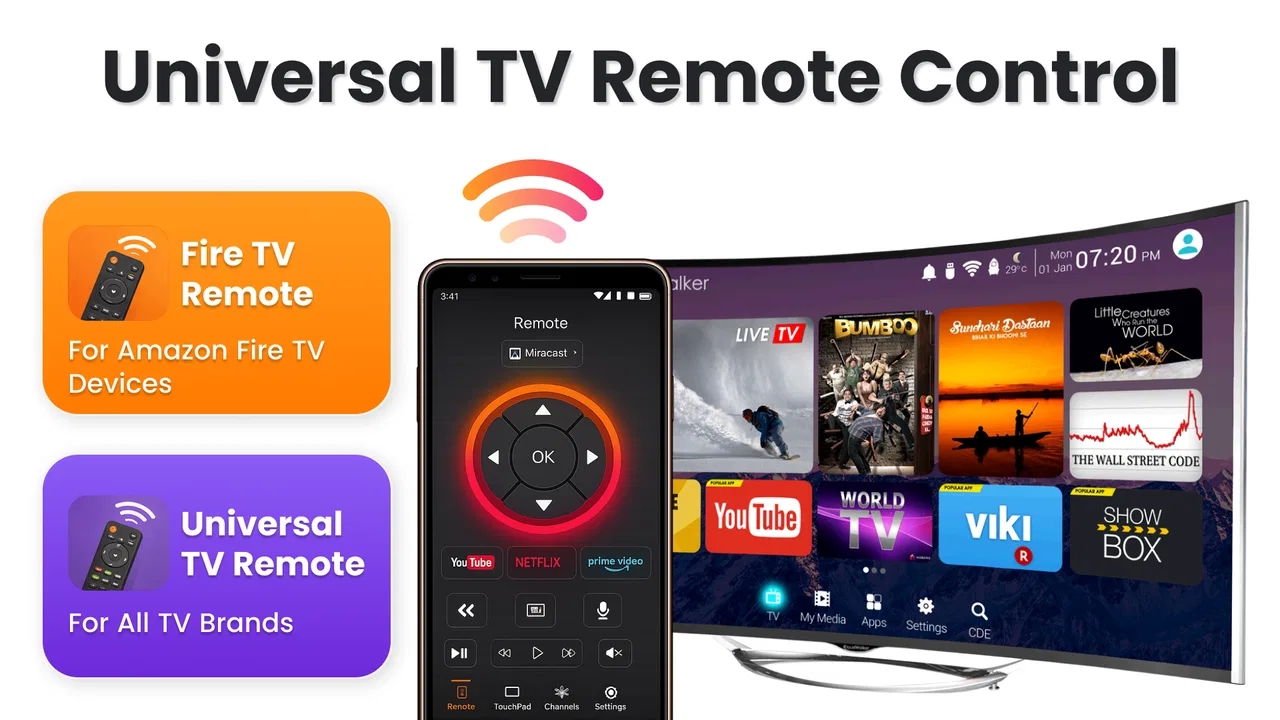
I tested Universal TV Remote Control as a practical home utility rather than treating it like a novelty remote. Its appeal is easy to understand: it aims to put everyday television controls and phone-to-TV screen mirroring in one place, using Wi-Fi instead of asking you to search for the physical handset. That combination can be genuinely useful, but it also means your home network and television compatibility matter more than they would with a basic infrared remote.
This is an Android app in the House & Home category, developed by Wallet Passes Alliance. It is free to install, carries an Everyone age rating, and has passed the 100K+ install mark. The current release is version 2.1.0, and it works on Android 8.0 or later. Those details make it accessible to people using older Android phones, although the real question is not simply whether the phone can run it. The important question is whether it fits the way you use your television.
What I considered before relying on it
Before I rely on a phone as the TV remote, I look beyond the first successful connection: the app has to fit the household’s network habits and be easy enough to reach when someone else needs it. I’d also think about whether mirroring is an occasional bonus or a task I expect to use often, since that changes what “worth keeping” means. Those checks help separate a useful routine from a brief novelty.
You May Also Like

 Blood Strike: 2.5 Anniversary
Blood Strike’s Loadouts Turn Every Drop Into a Tactical Gamble
A close look at Blood Strike’s custom loadouts: how fast access to signature weapons reshapes its battle royale rhythm, rewards preparation, and narrows the gap between fights.

 Pandora - Music & Podcasts
Pandora’s Music Is Easy to Start, but Harder to Recover
Pandora’s strength is its low-effort path from a seed to a station. Its weak spot is how much confidence it asks you to place in connection, setup, and quiet recovery.

 8 Ball Pool
 Is Built on Rivalries, Rematches, and Routine
A close look at the rivalries, rematches, shared routines, and unanswered safety questions that turn a quick pool match into a persistent mobile community.

 Samsung Music
’s Quiet Strength Is Playing What You Already Own
Its reach comes less from spectacle than from dependable access to a personal library. That simplicity is both the app’s strongest retention engine and its ceiling.

 AccuWeather: Weather Radar
AccuWeather Review: A Quick, Clear Forecast for Everyday Decisions
For everyday plans, the best forecast is the one you can understand quickly. AccuWeather makes rain timing, radar, and local conditions easy to act on, with a few trade-offs.

 Hill Climb Racing
Why Hill Climb Racing Still Turns Crashes Into One More Run
A tiny car, a bumpy hill and one more upgrade: Hill Climb Racing keeps resurfacing because its simple chaos makes every near-miss feel personal.
More From Our News Desk
View All News


The first decision is compatibility, not the number of buttons
When I choose a phone remote, I first ask how the television is connected. A Wi-Fi remote is most convenient when the phone and TV can see each other on the same home network. If the television is offline, connected to a different network, or restricted by a guest-network setup, the experience can become less straightforward than picking up a physical remote.
I would therefore try the app at home before making it my only control method. Keep the original remote nearby during setup, put the phone and television on the same network, and check whether the app can discover and control the TV. This simple test avoids a common mistake: assuming that the word “universal” means every television will behave identically.
The second decision is what you actually need. If you only want to change volume occasionally, a replacement handset or the TV maker’s own remote app may be the cleaner choice. If you regularly misplace the remote, want a convenient control surface on your phone, and sometimes need to show phone content on the television, this app has a stronger reason to exist.
Control and mirroring are separate reasons to install it
I found it useful to think of the two headline functions separately. Remote control is about quick actions: adjusting volume, changing channels or inputs, and handling basic television navigation from the phone. Mirroring is about putting the phone’s display on the larger screen. They may live in one app, but they solve different problems and can have different practical requirements.
For example, a person watching television from the sofa may value the remote function because the phone is already in hand. Someone showing photos to family may care more about mirroring. A household that rarely mirrors anything may prefer a simpler remote-only solution, while a user who wants both capabilities may appreciate not having to switch between unrelated tools.
My advice is to judge the app by your most frequent task, not by the feature list alone. A combined tool is valuable when both parts fit your routine. It is less compelling if one half is something you will never use.
Network habits affect the everyday experience
Wi-Fi control is convenient because it does not depend on pointing the phone at the television in the same way a traditional infrared handset does. That can help when the TV is mounted at an awkward angle or when the physical remote has disappeared under furniture. The trade-off is that the phone and television need a working network relationship.
I would avoid testing it for the first time on a guest network or in a home with several isolated Wi-Fi segments. Network isolation can make otherwise compatible devices difficult to discover. If the TV is connected by cable to the router while the phone uses Wi-Fi, that can still be perfectly workable in many homes, but the devices must remain visible to one another.
Another practical habit is to keep the phone unlocked and reasonably charged when using it for long viewing sessions. A physical remote is always ready and consumes very little attention. A phone remote competes with notifications, screen locking, calls, and other interruptions. That difference is small for a quick volume change but more noticeable during a long film.
Where Universal TV Remote Control is at its best
The strongest part of this app is the convenience of consolidation. I do not have to remember where the television remote was left, and I can use a device that is usually already beside me. For a household with several people who carry phones but regularly lose the handset, that can be more useful than it sounds.
The Wi-Fi approach also suits situations where pointing is inconvenient. If I am sitting off to the side, holding the phone in a natural position can be easier than aiming a small remote toward the television. It is also helpful when the physical remote has worn labels or when several similar handsets are mixed together in the living room.
The mirroring function gives the app a second practical role. I can imagine using it to show a photo, demonstrate something on a phone, or let another person see mobile content on a larger screen. The benefit is not that it replaces every casting or sharing method; rather, it gives the same app a reason to stay installed even when I am not using it as a remote.
The biggest win is convenience when your phone is already in your hand and both devices share a dependable home network. That is the situation in which the app feels more natural than reaching for a separate controller.
A realistic evening scenario
Imagine arriving home and finding that the television remote has slipped between the sofa cushions. Instead of interrupting dinner or searching the room, I can open the app, connect to the television, and handle the immediate controls from the phone. Later, a family member can use the mirroring side to put a set of holiday photos on the TV while everyone remains in the same room.
That scenario shows why the combination matters. The remote function solves a small but frequent annoyance, while mirroring adds a social use that a standard replacement handset cannot provide. The app does not need to transform television viewing to be worthwhile; it only needs to remove enough friction from ordinary moments.
Small workflows that make it more practical
I would set it up before an urgent need arises. Install it while the physical remote still works, verify the television connection, and learn where the main controls are. That way, the first real test is not during a live program when everyone is waiting for the volume to change.
I would also keep the phone and TV on the normal household network rather than relying on a temporary hotspot. A hotspot may appear convenient, but it can change how the devices discover each other and may not provide the same path to the television. The most reliable routine is usually the least complicated one: both devices on the network you use every day.
For mirroring, I would prepare the phone before starting. Close private messages, disable distracting notifications, and rotate the phone if the content benefits from a wider view. This is not an app-specific trick so much as good screen-sharing etiquette, but it matters because mirroring shows more of the phone experience than a simple remote command does.
Where the experience may feel less convenient
The main friction is the dependence on Wi-Fi. A physical remote remains useful when the router is offline or when the television has not joined the network. A manufacturer-specific app may also offer a more tailored experience for a particular TV family, especially if you want controls that closely match the original interface.
Phone controls can also feel less immediate than tactile buttons. With a physical remote, I can often press volume or navigation controls without looking. On a phone, I need to wake the display and find the right control area. That is a fair trade for having fewer devices around, but it is still a trade.
Mirroring should be viewed as a convenience feature rather than a guarantee that every phone activity will feel perfect on the television. Mobile interfaces are designed for touch, and content may look different when enlarged. I would use it for sharing suitable phone content, not assume that every app, game, or video service will behave exactly like a native TV application.
There is also a financial detail worth noticing. The app is free to install, but in-app purchases range from $0.99 to $99.99 per item. That makes it important to review any purchase prompt carefully instead of assuming every capability is included without cost. For someone who only wants basic remote access, the free starting point may be enough; for someone considering paid extras, the value depends on how often those extras would be used.
How it compares with the usual alternatives
A physical universal remote is the simplest alternative for dependable basic control. It does not require a phone screen, network discovery, or an app to be open. It is usually the better fit for a television in a guest room, for a user who dislikes phone controls, or for a household where the router is not always available.
The television manufacturer’s own mobile app is another category of alternative. It may be preferable when you want a tightly matched interface or brand-specific functions. The downside is that it can be less convenient if your home contains televisions from different makers and you want one general-purpose tool rather than several separate apps.
Dedicated casting and mirroring tools may be a better choice for people whose main goal is sharing phone content. They can be more appropriate when television control is secondary. Universal TV Remote Control makes more sense when you want the two jobs together and do not want to maintain separate tools for ordinary control and occasional screen sharing.
Finally, a television remote built into a smart-home platform may suit users who already organize their home around that platform. I would not switch solely for the promise of centralization, though. The extra setup and ecosystem dependence are worthwhile only if you already use the platform for other devices.
Who should use it, and who should skip it
I would recommend trying this app if you frequently lose the physical remote, keep your phone close while watching TV, or want a single utility that combines control with phone-screen mirroring. It is also a sensible experiment for families that share photos or other phone content in the living room and want a quick way to move from controlling the TV to showing something on it.
I would be more cautious if your television is rarely connected to Wi-Fi, your home network separates devices, or you need a remote that works instantly without touching a screen. In those cases, a physical controller is more dependable. I would also look elsewhere if your priority is a highly specialized interface for one television brand rather than broad convenience.
The Everyone rating makes the app approachable for a general household, but that does not remove the need for sensible setup. I would explain the network arrangement to less technical family members and leave the original remote somewhere accessible until the app has proved reliable in that home.
The cost of switching from a physical remote
Moving to a phone-based remote costs little in equipment because the app is free to install. The real cost is behavioral. Everyone who uses the TV must become comfortable with opening the app, selecting the correct device, and keeping the phone available. That is easy for some households and irritating for others.
There is also a backup question. I would not throw away the original remote after the first successful connection. Keep it for network outages, initial troubleshooting, and situations where someone needs a quick button press without borrowing a phone. A phone remote works best as a convenient primary option with a physical fallback, not necessarily as the only control in the house.
If a purchase prompt appears, I would decide based on a specific need rather than paying simply to unlock a larger feature set. The available purchase range is broad, so checking the exact item and its purpose matters. For occasional remote use, spending nothing may be the most sensible choice; frequent mirroring or heavier use could justify considering an upgrade if the offered function directly solves a problem for you.
My final recommendation
Universal TV Remote Control is worth trying when your television and phone live comfortably on the same Wi-Fi network and you want more than a replacement set of buttons. In my view, its strongest case is the combination of everyday TV control and occasional screen mirroring, especially for people who already keep their phone beside them on the sofa.
I would not present it as a universal answer for every living room. Network dependence, the less tactile nature of phone controls, and the possibility of paid in-app items all deserve attention. A physical remote remains better for simplicity, while a brand-specific tool may be better for specialized television features.
Still, the free entry point makes testing fairly easy, and the app has a clear practical identity in the House & Home space. With version 2.1.0 installed on a supported Android device, I would test discovery at home, try the controls during normal viewing, and then check whether mirroring fits the content I actually share. If those two functions work with your setup, Universal TV Remote Control can earn a permanent place on your phone—not because it replaces every alternative, but because it removes two small household hassles with one convenient tool.
FAQs for Universal TV Remote Control
01What devices are compatible with the Universal TV Remote Control app?
The Universal TV Remote Control app is designed to work with a wide range of TV brands and models, including smart TVs and older models. It supports major brands like Samsung, LG, Sony, and Panasonic. It's important to ensure your device is compatible by checking the app's specifications or the manufacturer's website before downloading.
02Do I need an internet connection to use the Universal TV Remote Control app?
The app primarily requires a Wi-Fi connection to function, as it communicates with your TV over a local network. However, some features may not require an internet connection, especially if your smartphone has an IR blaster. Checking your device's capabilities and the app's requirements can help clarify this.
03Is the Universal TV Remote Control app free to use?
The basic version of the Universal TV Remote Control app is typically free, offering essential remote control functionalities. However, there may be in-app purchases or a premium version available that unlocks additional features, such as an ad-free experience, advanced controls, or customization options. It's advisable to review the app's pricing details in the app store.
04What should I do if the Universal TV Remote Control app is not working with my TV?
If the app isn't working as expected, ensure your smartphone and TV are on the same Wi-Fi network. Check if your TV model is supported and update the app to the latest version. Restarting both devices and consulting the app's troubleshooting guide or customer support can also help resolve connectivity issues.
05How secure is the Universal TV Remote Control app?
Security is a priority for the Universal TV Remote Control app. It uses standard encryption protocols to protect your network connection. However, it's important to download the app from reputable sources like the Google Play Store or Apple App Store to avoid malicious versions. Regularly updating the app can also enhance security by fixing vulnerabilities.
Pros
- Easy setup with most TV brands.
- Intuitive interface for quick navigation.
- Works with smart and non-smart TVs.
- Customizable remote buttons.
- Supports voice commands for convenience.
Cons
- May not support all TV models.
- Ads can be intrusive during use.
- Requires stable Wi-Fi connection.
- Limited features in free version.
- Occasional lag in response time.

Universal TV Remote Control
Gallery